6 Different End-to-End Neural Networks

One of the highlights of the Udacity Self-Driving Car Engineer Nanodegree Program is the Behavioral Cloning Project.

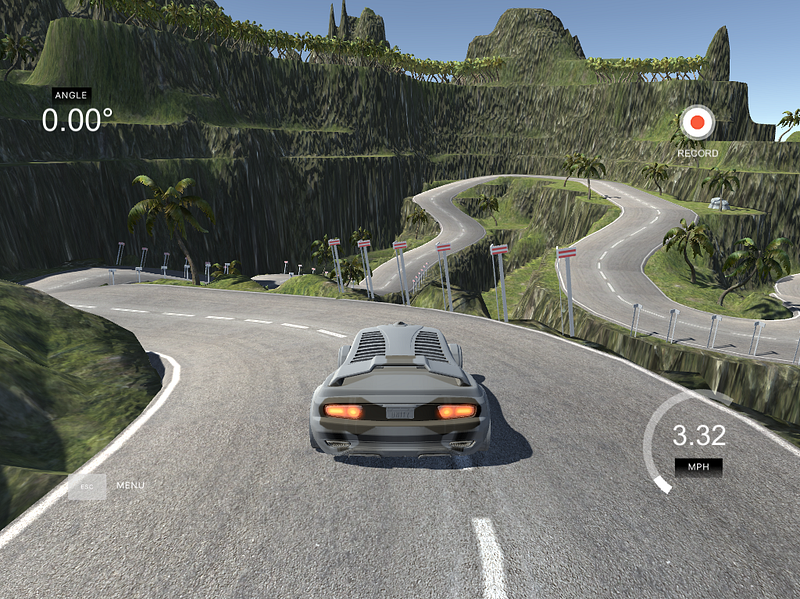
In this project, each student uses the Udacity Simulator to drive a car around a track and record training data. Students use the data to train a neural network to drive the car autonomously. This is the same problem that world-class autonomous vehicle engineering teams are working on with real cars!

There are so many ways to tackle this problem. Here are six approaches that different Udacity students took.

Self-Driving Car Engineer Diary — 5

Andrew Wilkie

Andrew’s post highlights the differences between the Keras neural network framework and the TensorFlow framework. In particular, Andrew mentions how much he likes Keras:

“We were introduced to Keras and I almost cried tears of joy. This is the official high-level library for TensorFlow and takes much of the pain out of creating neural networks. I quickly added Keras (and Pandas) to my Deep Learning Pipeline.”

Self-Driving Car Simulator — Behavioral Cloning (P3)
Jean-Marc Beaujour

Jean-Marc used extensive data augmentation to improve his model’s performance. In particular, he used images from offset cameras to create “synthetic cross-track error”. He built a small model-predictive controller to correct for this and train the model:

“A synthetic cross-track error is generated by using the images of the left and of the right camera. In the sketch below, s is the steering angle and C and L are the position of the center and left camera respectively. When the image of the left camera is used, it implies that the center of the car is at the position L. In order to recover its position, the car would need to have a steering angle s’ larger than s:

tan(s’) = tan(s) + (LC)/h”

Behavioral Cloning — Transfer Learning with Feature Extraction
Alena Kastsiukavets

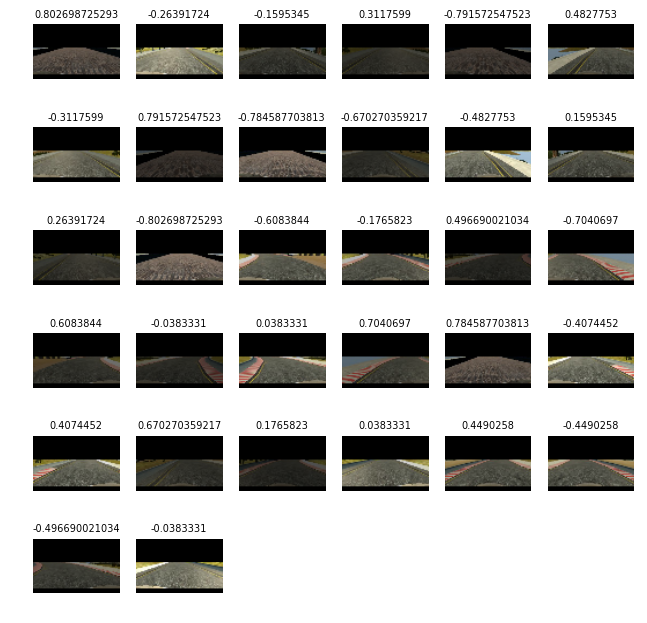
Alena used transfer learning to build her end-to-end driving model on the shoulders of a famous neural network called VGG. Her approach worked great. Transfer learning is a really advanced technique and it’s exciting to see Alena succeed with it:

I have chosen VGG16 as a base model for feature extraction. It has good performance and at the same time quite simple. Moreover it has something in common with popular NVidia and comma.ai models. At the same time use of VGG16 means you have to work with color images and minimal image size is 48×48.

Introduction to Udacity Self-Driving Car Simulator
Naoki Shibuya

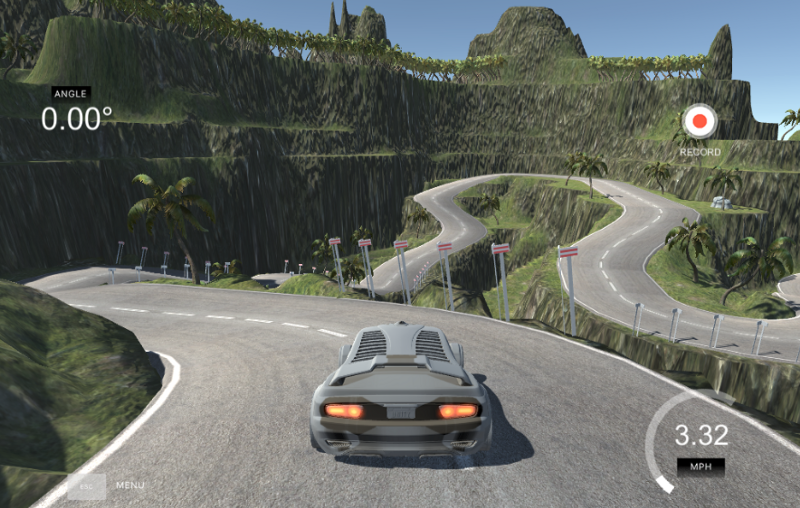
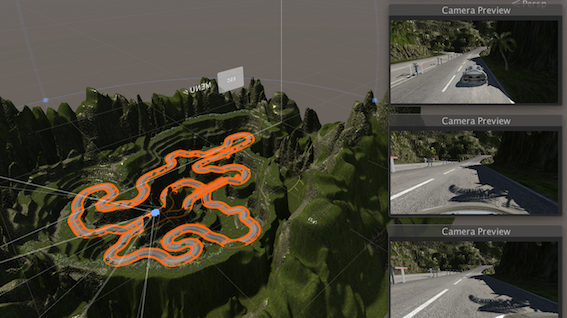
The Behavioral Cloning Project utilizes the open-source Udacity Self-Driving Car Simulator. In this post, Naoki introduces the simulator and dives into the source code. Follow Naoki’s instructions and build a new track for us!

“If you want to modify the scenes in the simulator, you’ll need to deep dive into the Unity projects and rebuild the project to generate a new executable file.”

MainSqueeze: The 52 parameter model that drives in the Udacity simulator
Mez Gebre

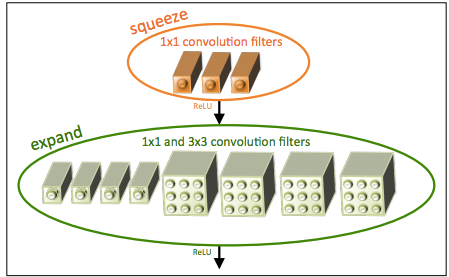
In this post, Mez explains the implementation of SqueezeNet for the Behavioral Cloning Project. This is smallest network I’ve seen yet for this project. Only 52 parameters!

“With a squeeze net you get three additional hyperparameters that are used to generate the fire module:

1: Number of 1×1 kernels to use in the squeeze layer within the fire module

2: Number of 1×1 kernels to use in the expand layer within the fire module

3: Number of 3×3 kernels to use in the expand layer within the fire module”

GTA V Behavioral Cloning 2

Renato Gasoto

Renato ported his behavioral cloning network to Grand Theft Auto V. How cool is that?!
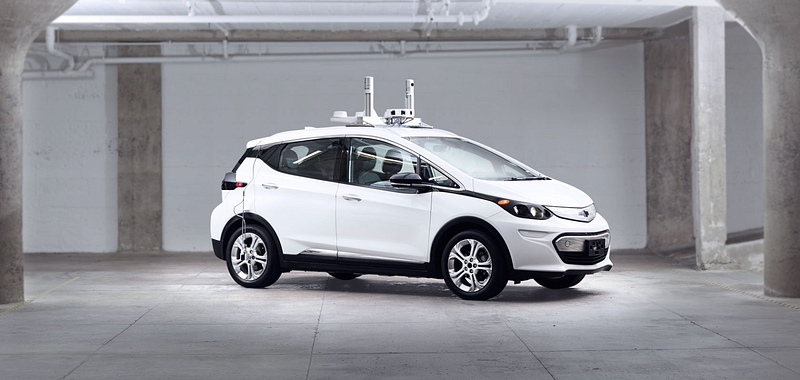
GM to Deploy “Thousands” of Self-Driving Cars in 2018

Reuters, relying on two anonymous sources, claims that GM will “deploy thousands of self-driving electric cars in test fleets” during 2018.

The testing will happen in partnership with Lyft and would vault GM ahead of any other auto manufacturer. Most auto manufacturers have committed to testing cars in 2020 or later.

I don’t know whether to believe this or not, but it’s exciting.

How Udacity Students Learn Computer Vision

The Udacity Self-Driving Car Engineer Nanodegree Program teaches both standard computer vision techniques, and deep learning with convolutional neural networks.

Both of these approaches can be for working with images, and it’s important to understand standard computer vision techniques, particularly around camera physics. This knowledge improves the performance of almost all image manipulation tools.

Here are some of the skills that Udacity students mastered while using standard computer vision techniques to handle highway perception tasks. Check out how similar these images and videos look to what you might see on cutting edge autonomous driving systems!

Advanced Lane Finding

Milutin N. Nikolic

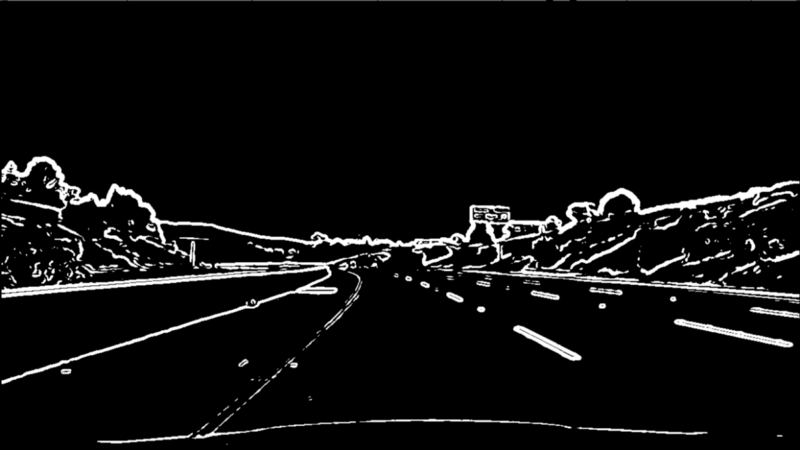
This is a terrific summary of the mathematics underpinning lane-finding. Milutin covers vanishing points, camera calibration and undistortion, and temporal filtering. If you’re interested in diving into the details of how a camera can find lane lines, this is a great start.

Here’s an example:

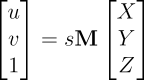
“Before we move further on, lets just reflect on what the camera matrix is. The camera matrix encompasses the pinhole camera model in it. It gives the relationship between the coordinates of the points relative to the camera in 3D space and position of that point on the image in pixels. If X, Y and Z are coordinates of the point in 3D space, its position on image (u and v) in pixels is calculated using:

where M is camera matrix and s is scalar different from zero.”

Feature extraction for Vehicle Detection using HOG+

Mohan Karthik

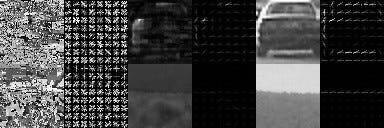
Feature extraction is the key step in building a vehicle detection pipeline. There are a variety of tools that can extract vehicle features that we can use to differentiate vehicles from non-vehicles, including neural networks and gradient thresholds. This post provides a practical guide to using a histogram of oriented gradients (HOG) to extract features. In particular, the examination of different color spaces is of interest:

“Here, we see a decent difference in S and V channel, but not much in the H channel. So maybe in terms of color histogram, RGB and the S & V channel of HSV are looking good.”

Advanced Lane detection

Mehdi Sqalli

This is a step-by-step guide to how to identify lane lines using standard computer vision techniques on a variety of highway driving videos.

“1: Camera Calibration and Image Undistortion.

2: Image filtering.

3: Perspective transform

4: Lane detection

5: Displaying the detected lane.”

Udacity Students Who Love Neural Networks

Neural networks is one of the first topics we cover in Udacity’s Self-Driving Car Engineer Nanodegree Program. These are exciting tools, and students can accomplish a lot with them very quickly.

The program covers deep neural networks, convolutional neural networks, transfer learning, and other sophisticated topics. But some students want to go even beyond what we cover in the course.

Here are blog posts from three students who love neural networks and found their own ways to have fun with them.

Which would be an optimal home computer configuration for Machine Learning (ML)?

Oliver Valls HernĂ ndez

Oliver dives into the guts of his desktop machine to figure out what components he needs to upgrade for a killer deep learning machine. He says to focus on the GB/s memory throughput of the GPU.

Here’s Oliver’s take on GPU options:

“Nvidia is betting big for Machine Learning with its CUDA parallel computing architecture and platform. Nothing against other manufacturers, but for ML, this is the one to go. Ignore the Quadro commercial line, to get good performance look for GTX 900 or higher. The recommendations I had were always for the GTX 1060 or higher.”

What I’ve learned about Neural Networks when porting MiniFlow from Python to JavaScript

Peter TEMPFLI

MiniFlow is a toy neural network library that my colleague Dom Luna built for the Udacity Self-Driving Car Program. We walk students through the code in order to teach them how neural networks work. Udacity student Peter Tempfli ported MiniFlow from Python to JavaScript!

Here’s what Peter learned:

“Every network has an optional point, where it returns the lowest error value. We want to move our input parameters to the direction of this optional point. Let’s model a function with a ‘valley’, and the current x,y point with the position of the ‘ball’. In order to move the ball to the lowest point of the ‘valley’, we need to adjust the w parameter in the direction of steepest line. The point here is that there is only one ‘best’ direction — this is the gradient for the given point.”

TensorFlow 1.0 — Top 3

Krishna Sankar

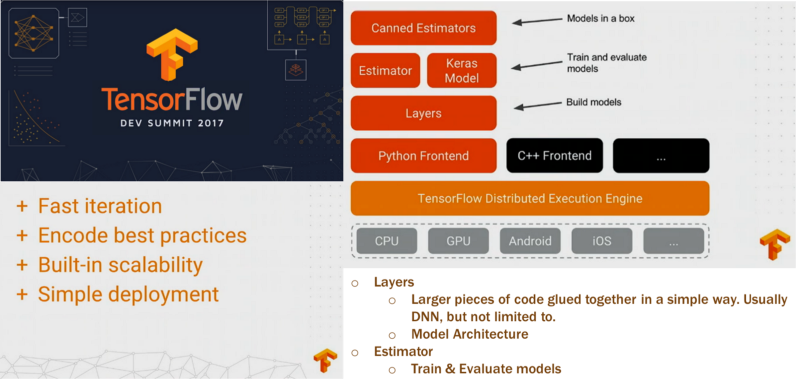
TensorFlow is the core deep learning library that students learn in the Udacity Self-Driving Car Program. It’s Google’s deep learning library, and it’s quickly taking over the machine learning world. Udacity student Krishna Sankar went to the latest TensorFlow Dev Summit, and reports back:

“The “Layers” layer makes it easier to construct models directly from neural network concepts without a lot of impedance. This is where Keras filled a vacuum.”

How Udacity’s Self-Driving Car Students Approach Behavioral Cloning

Udacity believes in project-based education. Our founder, Sebastian Thrun, likes to say that you don’t lose weight by watching other people exercise. You have to write the code yourself!

Every module in the Udacity Self-Driving Car Engineer Nanodegree Program builds up to a final project. The Deep Learning Module culminates in one of my favorite—Behavioral Cloning.

The goal of this project is for students to build a neural network that “learns” how to drive a car like a human. Here’s how it works:

First, each student records his or her own driving behavior by driving the car around a test track in the Udacity simulator.

Then, each student uses this data to train a neural network to drive the car around the track autonomously.

There are all sorts of neat ways to approach this problem, and it seems like Udacity students tried all of them! Here are excerpts from—and links to—blog posts written by five of our Self-Driving Car students, each of whom takes a different approach to the project.

Training a Self-Driving Car via Deep Learning

James Jackson

James Jackson’s post is a great overview of how to approach this project, and he adds a twist by implementing data smoothing. We didn’t cover data smoothing in the instructional material, so this is one of many examples of Udacity students going above and beyond the instructional material to build terrific projects.

“Recorded driving data contains substantial noise. Also, there is a large variation in throttle and speed at various instances. Smoothing steering angles (ex. SciPy Butterworth filter), and normalizing steering angles based on throttle/speed, are both investigated.”

Behavioral Cloning

JC Li

This is a terrific post about the mechanics of building a behavioral cloning model. It really stands out for JC’s investigation of Gradient Activation Mappings to show how which pixels in an image have the most effect on the model’s output.

“The whole idea is to using heatmap to highlight locality areas contributing most to the final decision. It was designed for classification purpose, but with slight change, it can be applied to our steering angle predictions.”

Behavioural Cloning Applied to Self-Driving Car on a Simulated Track

Joshua Owoyemi

This post has a great discussion of data augmentation techniques for neural network training, including randomly jittering data from the training set. Joshua used over 100,000 images for training!

“Though there was more than 100,000 training data, each epoch consisted of 24,064 samples. This made the training more tractable, and since we were using a generator, all of the training data was still used in training, however at different epochs.”

Self Driving Car — Technology drives the Future !!

Sujay Babruwad

Sujay applied a number of different augmentations to his training data, including brightness and shadow augmentations. This helped his model generalize to a new, darker test track.

“The training samples brightness are randomly changed so as to have training data that closely represent various lighting conditions like night, cloudy, evening, etc.”

You don’t need lots of data! (Udacity Behavioral Cloning)

A Nguyen

This post encourages students by showing how it’s possible to build a behavioral cloning model without tens of thousands of training images. The secret is to use side cameras and data augmentation.

“Just like anything we do, the longer we practice, the better we are good at it because we take in hour and hour of data into our brain memory/muscle memory. It’s the same here for neural net, the more variety of data you have to train your network, the better the model is at the task.”


As you can see from these examples, there is no one right way to approach a project like this, and there is a great deal of room for creativity. What should also be clear is that our students are incredible!

We’re very excited about the next projects on the horizon, and we look forward to sharing more amazing student work with you soon!

Udacity Student Kiki Jewell on Driving for Cruise Automation

Back when I was trying to break into the autonomous vehicle industry, I applied for a lot of jobs. Including a job “driving” self-driving cars for Google.

I got rejected.

The rules required a clean driving record for the past three years, and 2.5 years prior I had gotten a ticket for talking on a cellphone.

But this is the type of thing you do when you are really excited about changing your career trajectory. You try anything and everything to get close to where you want to be, and the answer always has to be “yes”.

In that spirit, I was really excited to read this post by Udacity Self-Driving Car student Kiki Jewell.

While she is studying to become an autonomous vehicle engineer, Kiki applied to “drive” autonomous vehicles for Cruise. Unlike me, she got the job. And she is learning a ton!

This is not like driving. It is much more like training a driver. You cannot relax and let your driving instincts take over, like driving for a ride sharing company or driving on a commute. You are watching the car drive, and being hyper-alert at all times, in case a human driver acts unpredictably.

How about this?

We’ve had the public throw boxes into the street in front of the car, pretend to roll over the hood as if we’d hit them, try to kick at the sensors, or even just yell at us to go when the car has decided it is still unsafe.

The future seems bright:

There is always room for improvement, and Cruise will be around for a long time, making things better and better, striving always diligently towards unattainable perfection. But they are so far along, and so rapidly improving every day, it’s stunning to watch!

Read the whole thing!

Term 2: In-Depth on Udacity’s Self-Driving Car Curriculum

Update: Udacity has a new self-driving car curriculum! The post below is now out-of-date, but you can see the new syllabus here.

The very first class of students has finished Term 1 of the Udacity Self-Driving Car Engineer Nanodegree Program! We are so excited by their accomplishments—they have built traffic sign classifiers, end-to-end neural networks for driving, lane-finding algorithms, and vehicle tracking pipelines.

Now it’s time for Term 2 — hardcore robotics.

The focus of Term 1 was applying machine learning to automotive tasks: deep learning, convolutional neural networks, support vector machines, and computer vision.

In Term 2, students will build the core robotic functions of an autonomous vehicle system: sensor fusion, localization, and control. This is the muscle of a self-driving car!

Term 2

Sensor Fusion

Our terms are broken out into modules, which are in turn comprised of a series of focused lessons. This Sensor Fusion module is built with our partners at Mercedes-Benz. The team at Mercedes-Benz is amazing. They are world-class automotive engineers applying autonomous vehicle techniques to some of the finest vehicles in the world. They are also Udacity hiring partners, which means the curriculum we’re developing together is expressly designed to nurture and advance the kind of talent they would like to hire!

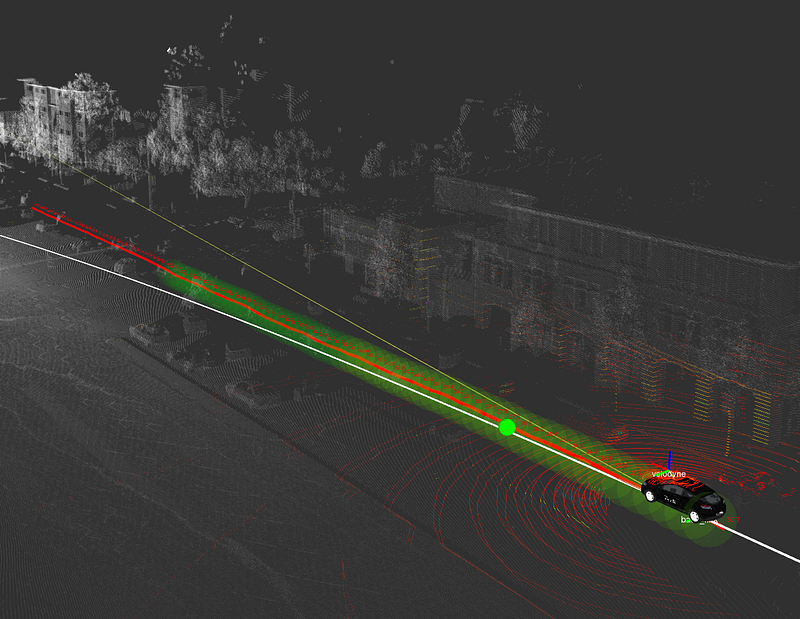
Lidar Point Cloud

Below please find descriptions of each of the lessons that together comprise our Sensor Fusion module:

  1. Sensors
    The first lesson of the Sensor Fusion Module covers the physics of two of the most import sensors on an autonomous vehicle — radar and lidar.
  2. Kalman Filters
    Kalman filters are the key mathematical tool for fusing together data. Implement these filters in Python to combine measurements from a single sensor over time.
  3. C++ Primer
    Review the key C++ concepts for implementing the Term 2 projects.
  4. Project: Extended Kalman Filters in C++
    Extended Kalman filters are used by autonomous vehicle engineers to combine measurements from multiple sensors into a non-linear model. Building an EKF is an impressive skill to show an employer.
  5. Unscented Kalman Filter
    The Unscented Kalman filter is a mathematically-sophisticated approach for combining sensor data. The UKF performs better than the EKF in many situations. This is the type of project sensor fusion engineers have to build for real self-driving cars.
  6. Project: Pedestrian Tracking
    Fuse noisy lidar and radar data together to track a pedestrian.

Localization

This module is also built with our partners at Mercedes-Benz, who employ cutting-edge localization techniques in their own autonomous vehicles. Together we show students how to implement and use foundational algorithms that every localization engineer needs to know.

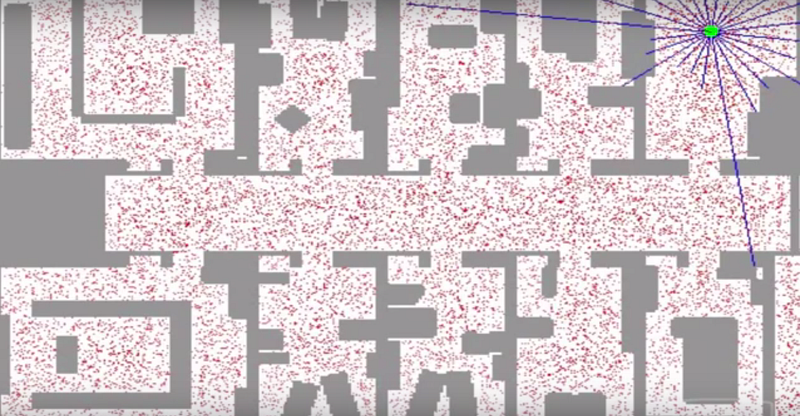
Particle Filter

Here are the lessons in our Localization module:

  1. Motion
    Study how motion and probability affect your belief about where you are in the world.
  2. Markov Localization
    Use a Bayesian filter to localize the vehicle in a simplified environment.
  3. Egomotion
    Learn basic models for vehicle movements, including the bicycle model. Estimate the position of the car over time given different sensor data.
  4. Particle Filter
    Use a probabilistic sampling technique known as a particle filter to localize the vehicle in a complex environment.
  5. High-Performance Particle Filter
    Implement a particle filter in C++.
  6. Project: Kidnapped Vehicle
    Implement a particle filter to take real-world data and localize a lost vehicle.

Control

This module is built with our partners at Uber Advanced Technologies Group. Uber is one of the fastest-moving companies in the autonomous vehicle space. They are already testing their self-driving cars in multiple locations in the US, and they’re excited to introduce students to the core control algorithms that autonomous vehicles use. Uber ATG is also a Udacity hiring partner, so pay attention to their lessons if you want to work there!

Here are the lessons:

  1. Control
    Learn how control systems actuate a vehicle to move it on a path.
  2. PID Control
    Implement the classic closed-loop controller — a proportional-integral-derivative control system.
  3. Linear Quadratic Regulator
    Implement a more sophisticated control algorithm for stabilizing the vehicle in a noisy environment.
  4. Project: Lane-Keeping
    Implement a controller to keep a simulated vehicle in its lane. For an extra challenge, use computer vision techniques to identify the lane lines and estimate the cross-track error.

I hope this gives you a good sense of what students can expect from Term 2! Things may change along the way of course, as we absorb feedback, incorporate new content, and take advantage of new opportunities that arise, but we’re really excited about the curriculum we’ve developed with our partners, and we can’t wait to see what our students build!

In case you’d like a refresher on what was covered in Term 1, you can read my Term 1 curriculum post here.

In closing, if you haven’t yet applied to join the Udacity Self-Driving Car Engineer Nanodegree Program, please do! We are taking applications for the 2017 terms and would love to have you in the class!

Ford and Argo AI

Ford just committed to investing $1 billion in a nascent startup called Argo AI.

Despite my fondness for, and gratitude to, Ford Motor Company, I confess this is a little bit of a head-scratcher. The whole thing is just so unusual.

Why $1 BB?

Why over 5 years?

Why invest in the company instead of buying it outright?

Just to justify it after the fact, I might say something like this:

Ford has been betting big on self-driving cars for a while. But there are factors about the larger Ford Motor Company organization that make it difficult to move as fast as Ford CEO Mark Fields might want.

Ford HR has more structure and process than in a startup. Every new hire has to go through a drug screen. There are pay bands that might not line up with the salaries demanded by top AV engineers.

Ford IT is very concerned about security, which has implications for sharing code and using cloud computing services.

Ford Legal has a risk / reward view of the world that maybe doesn’t match up with the risk that say, Elon Musk, is willing to take.

There are other examples.

A year ago, to surmount these issues, Ford created Ford Smart Mobility, LLC. But unlike Argo AI, Ford Smart Mobility LLC is still a wholly-owned subsidiary of Ford. Maybe CEO Mark Fields wants to try something more radical.

One option is to fund a startup. But keep the investment at arms-length, so if anything goes terribly wrong, it won’t blow back on Ford Motor Company.

So instead of buying this new startup $1 BB, like GM did with Cruise, Ford is buying a big stake in the startup for much less (how much they own and at what price is not public). If all goes well, at some later date they can buy the rest of the startup and incorporate it into Ford Motor Company.

That’s pure speculation, but it’s the best I’ve got.

Open-Source Simulator

When we started designing the curriculum for the Udacity Self-Driving Car Engineer Nanodegree Program, I thought it would be fun to have students complete a behavioral cloning project in a simulator.

The idea was that students would drive a car around a test track in a simulator, record simulated camera data, and then build a deep neural network to drive the car in autonomously.

This is a cutting edge project that many autonomous vehicle startups are working on now in real life, and I figured it would be relatively simple to put it together as a project.

Man, was I wrong. We tried out many commercial simulators, none of which quite met our needs for various reasons. One was too realistic — students would have had to model the physical forces acting on the tires, another was way to unrealistic, others didn’t work on the various operating systems our students use.

So we wound up rolling our own simulator from scratch, using the Unity gaming engine. That brought its own set of pains, but it resulted in a really fun and educational project for students.

Yesterday we pushed the simulator code to GitHub and open-sourced it, so the world can help us improve the simulator and maybe people can even repurpose it for their own needs.

Check it out!

In full disclosure, I conceived of this project but I have not written a single line of code in the repo. Eric built the bulk of the simulator, with later assists from Yousuf, Dom, and Aaron. Kudos to them!

Udacity Students on Deep Learning, Hacking, and Autonomous History

Great posts by Udacity Self-Driving Car students on diverse topics! End-to-end deep neural networks, hacking a car, and the history of autonomy.

End-to-end learning for self-driving cars

Alex Staravoitau

This is a concise, practical post detailing how Alex built his end-to-end network for driving a simulated vehicle. His discussion of balancing the dataset is particularly interesting.

Just as one would expect, resulting dataset was extremely unbalanced and had a lot of examples with steering angles close to 0 (e.g. when the wheel is “at rest” and not steering while driving in a straight line). So I applied a designated random sampling which ensured that the data is as balanced across steering angles as possible. This process included splitting steering angles into n bins and using at most 200 frames for each bin

Jetson TX1 and ZED stereo camera warm up.

Dylan Brown

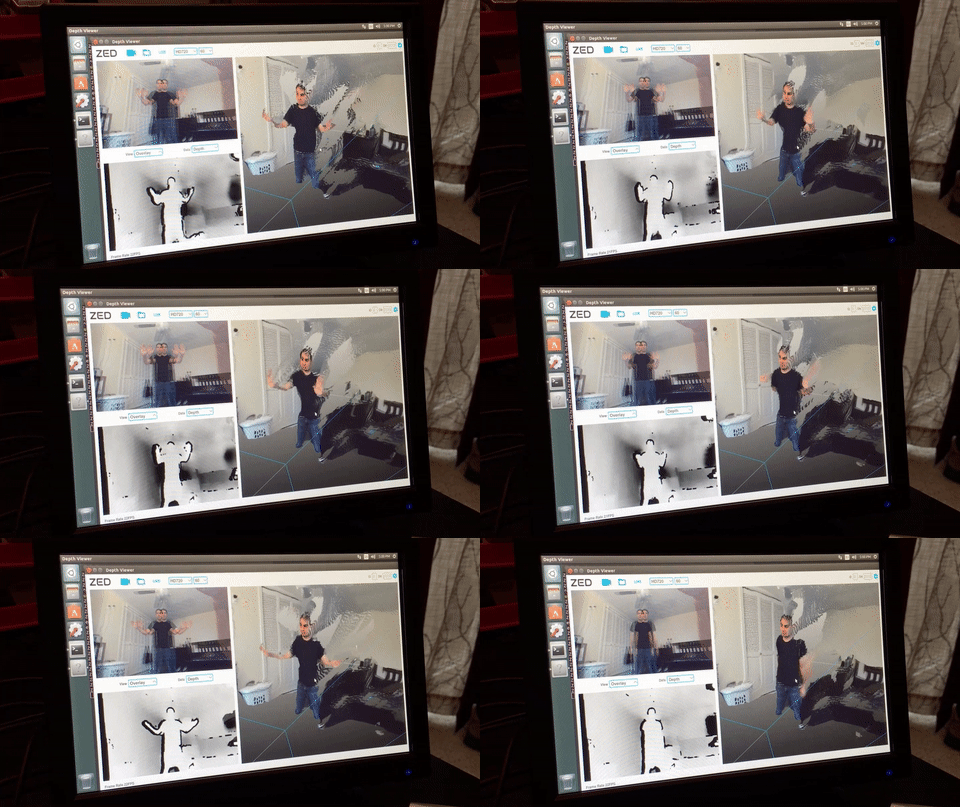
This is the latest in Dylan’s series on hacking his Subaru and turning it into a self-driving car. (This is not part of the Udacity program and we do not recommend this!) In this post, he unpacks his Jetson TX1 and gets the cameras do to some neat tricks.

The lighting conditions seem to make a difference with regard to depth accuracy. I’m excited to see how it performs outdoors. I plan to mount it just in front of my rear view mirror, where it will be mostly hidden from the driver’s field of view. I’m not sure about USB cable routing yet. It’s long enough to reach directly down to the dashboard, but I’d rather conceal it behind some interior panels.

2017: The year for autonomous vehicles

Bill Zito

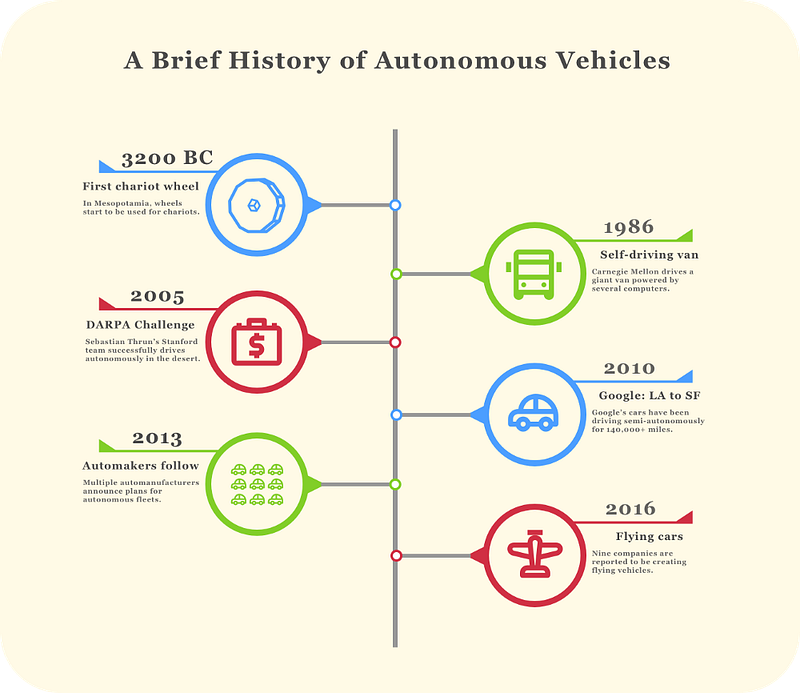
This is a great historical summary of autonomy, starting with the wheel (really, starting with ALVINN) and going through current efforts at autonomous personal aircraft.

If you had come to this article 10 years ago, hardly anyone would have heard of autonomous cars, or thought them possible for that matter. Now, there are ~100 companies working on autonomous vehicles, dozens of which have already been operating semi-autonomous vehicles.